المشاركات

عرض الرسائل ذات التصنيف android studio

Replace Text with star (***) while typing in java android studio

 EditText edittxtpassword = findViewById(R.id.edittxtpassword);  edittxtpassword.setTransformationMethod(new  MyPasswordTransformationMethod()); public class MyPasswordTransformationMethod extends PasswordTransformationMethod { @Override public CharSequence getTransformation(CharSequence source, View view) { return new PasswordCharSequence(source); } private class PasswordCharSequence implements CharSequence { private CharSequence mSource; public PasswordCharSequence(CharSequence source) { mSource = source; } public char charAt(int index) { return '*'; } public int length() { return mSource.length(); } public CharSequence subSequence(int start, int end) { return mSource.subSequence(start, end); // Return default } } };     source : https://wordpress.com/post/qforce519945958.wordpress.com/236
Execution failed for task ':app:validateSigningDebug'. > Keystore file path/namefile.jks' not found for signing config 'externalOverride'

 problem : Execution failed for task ':app:validateSigningDebug'. > Keystore file path/namefile.jks' not found for signing config 'externalOverride' Solution : This error occurs because the wrong path to the 'keystore.jks' file was specified. Find the correct path of the file "keystore.jks" in your computer and the problem will be resolved successfully.  

An error occurred while trying to compute required packages in ubuntu

Problem : An error occurred while trying to compute required packages in Android Studio Solution : Write in terminal 

Execution failed for task ':app:packageDebug'. > A failure occurred while executing com.android.build.gradle.internal.tasks.Workers$ActionFacade > Entry name collided

 Problem Execution failed for task ':app:packageDebug'. > A failure occurred while executing com.android.build.gradle.internal.tasks.Workers$ActionFacade > Entry name   collided Solution: Delete previous APK  OR Add this code in gradle.properties  android.useNewApkCreator = false Thank you

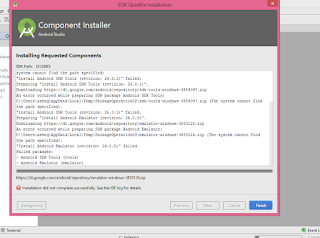
Installation did not complete successfully. see the IDE log for details - Android studio

صورة
First :   Downloaded SDK from beginning , and change the SDK path to the new one, then it all will work  Downloaded SDK from beginning , and change the SDK path to the new one, then it all will work.  Second : Run android studio with Administrator Mode

طريقة فتح ملف pdf على الانترنت من خلال كود جافا اندرويد استوديو

How to open pdf file from code java android studio ............... WebView webview = new WebView ( this ); setContentView ( webview ); webview . getSettings (). setJavaScriptEnabled ( true ); webview . getSettings (). setPluginsEnabled ( true ); webview . loadUrl ( "http:/url/fileName.pdf" ); setContentView ( webview );

حل مشكلة الأندرويد ستوديو Start Failed

صورة
Internal error. Please report to https://code.google.com/p/android/issues . . . حل المشكلة : يوجد طريقيتين الأولى  فصل الجهاز عن الانترنت ومن ثم تشغيل Android Studio الطريقة الثانية  ابحث عن ملف bin وابحث بداخله عن ملف idea.properties وافتحه عبر النوت باد وأضف له السطر التالي disable.android.first.run=true  ثم احفظ الملف. وبعدها شغل Android studio وستحل المشكلة بشكل كامل شكرا للمتابعة  :)

مشكلة في اندرويد استوديو (ضبط التطبيق مع حجم الشاشة)

صورة
السبب في ذلك استخدام وحدة قياس ووحدة وزن خاطئة ، حاول دائماً استخدام (Match Parent) وحاول الابتعاد عن Relative Layout واستخدم بديلاً عنها Linear Layout كما في المثال التالي <LinearLayout xmlns:android="http://schemas.android.com/apk/res/android"     android:id="@+id/main_layout"     android:layout_width="match_parent"     android:layout_height="match_parent"     android:orientation="vertical"     android:weightSum="8" > <TextView         android:id="@+id/disp"         android:layout_width="match_parent"         android:layout_height="0dp"         android:layout_weight="1"         android:gravity="center"         android:inputType="none"         android:textAppearance="?android:attr/textAppearanceLarge"         android:textColor="@android:c...